Define Database Models
When developing plugins, you may need to define your own database models to store and manage data. g0v0 uses SQLAlchemy + SQLModel to handle database operations; and uses a wrapped Alembic to handle database migrations.
Create Database Models
To define a new database model, you need to create a class that inherits from DatabaseModel in your plugin's __init__.py file. For example, assuming your plugin ID is my_plugin, you can define a new database model like this:
from app.database._base import DatabaseModel
from sqlmodel import Field

class MyPluginModel(DatabaseModel, table=True):
    __tablename__ = "mytable"  # -> plugin_my_plugin_mytable

    id: int = Field(primary_key=True)
    name: str = Field(max_length=255, nullable=False)
In the example above, we defined a database model named MyPluginModel with two fields: id and name. The __tablename__ attribute specifies the database table name, and g0v0 will automatically prefix it with the plugin ID to avoid conflicts with other plugins or core database tables.
DatabaseModel works the same as SQLModel, and you can use all features supported by SQLModel to define your database models. However, it adds the following two features:
- When dumping to JSON, datetime objects are automatically converted to ISO format strings with UTC timezone. This solves the problem that MySQL's built-in
DATETIMEtype does not support timezones. - Control output fields when dumping. See Controlling Output Fields and Dynamic Computed Fields below for details.
Database Migration
After defining database models, you need to create a database migration file to apply the model to the database. We provide the g0v0-migrate command-line tool to help you create and manage database migrations. Its usage is basically the same as Alembic. The difference is that you need to run the command in the plugin directory. It will automatically generate migration scripts independent of the core database and other plugin migration histories, and place them in the plugin's migrations/ folder.
cd plugins/my_plugin
g0v0-migrate revision -m "Create my_plugin_mytable" --autogenerate
g0v0-migrate upgrade head
Implementation Details
See #97
Usage
After defining database models and completing migrations, you can use the model in other parts of your plugin. For example, you can use it in API endpoints to handle database operations:
from app.dependencies.database import Database
from app.plugins import register_api

router = register_api()

@router.post("/items/")
async def create_item(db: Database):
    item = MyPluginModel(name="Example Item")
    db.add(item)
    await db.commit()
    await db.refresh(item)
    return item
Controlling Output Fields and Dynamic Computed Fields
The power of DatabaseModel is that you can control output fields in large database models, avoiding leaking sensitive information or reducing unnecessary data transfer.
Implementation Details
See this blog post: An On-Demand Design Within SQLModel
Field Types and Model Definition Structure
In this mechanism, fields have four types:
- Normal fields: Default type, can both store data and be output.
- Computed fields: Do not store data, but are dynamically computed through a method.
- Normal on-demand fields: Not output by default, only output when explicitly specified in
Model.transform(). - Computed on-demand fields: Do not store data and are not output by default, only output when explicitly specified in
Model.transform().
You can see the example code below to understand how to define these fields:
from typing import TypedDict, NotRequired

from app.database._base import DatabaseModel, OnDemand, included, ondemand

from sqlmodel import Field
from sqlmodel.ext.asyncio.session import AsyncSession

class DataDict(TypedDict):
    id: int
    name: str
    name_length: int

    secret_info: NotRequired[str]
    secret_info_length: NotRequired[int]


class DataModel(DatabaseModel[DataDict]):
    __tablename__ = "mytable"

    # Normal fields
    id: int = Field(primary_key=True)
    name: str = Field(max_length=255, nullable=False)

    # Computed field, marked with `@included` decorator, indicating it will be output by default
    @included
    @staticmethod
    async def name_length(_session: AsyncSession, data: "Data") -> int:
        return len(data.name)

    # Normal on-demand field, marked with `OnDemand` type, indicating it is not output by default, only when explicitly specified in `transform()`
    secret_info: OnDemand[str] = Field(max_length=255, nullable=False)

    # Computed on-demand field, marked with `@ondemand` decorator, indicating it neither stores data nor is output by default, only when explicitly specified in `transform()`
    @ondemand
    @staticmethod
    async def secret_info_length(_session: AsyncSession, data: "Data") -> int:
        return len(data.secret_info)


class Data(DataModel, table=True):
    ...
You will also notice that we use a Dict - Model - Table three-layer structure to define database models. This is to better support type hints and data validation for on-demand fields. You can:
- Use
Dictfor type hints on output results - Use
Modelto define the logical structure of the database model - Use
Tableto handle database table mapping relationships and associations
Warning
When using OnDemand, you need to wrap the entire type in OnDemand. Do not mix OnDemand with Union or other types, otherwise it may cause issues with type hints and data validation.
# Wrong example
secret_info: OnDemand[str] | None = Field(max_length=255, nullable=False)
# Correct example
secret_info: OnDemand[str | None] = Field(max_length=255, nullable=False)
Transform Data
You can use the Model.transform() method to transform data and control output fields. For example:
data = await db.get(Data, 1)
# By default, only normal fields and computed fields are output
print(Data.transform(data))
# Output the `secret_info` field
print(Data.transform(data, includes=["secret_info"]))
Computation Context and Nested Includes
Computed fields and on-demand field methods support passing parameters that can be used during computation. For example:
@included
@staticmethod
async def name_length(
    _session: AsyncSession,
    data: "Data",
    multiplier: int = 1
) -> int:
    return len(data.name) * multiplier
In the transform() method, you need to pass the context through the multiplier parameter:
data = await db.get(Data, 1)
print(Data.transform(
        data,
        includes=["name_length"],
        multiplier=2,
    )
)
You can also use the transform() method in computed fields to implement nested includes. Simply accept an additional includes parameter and pass it to the transform() method:
@included
@staticmethod
async def sub_table(session: AsyncSession, data: "Data", includes: list[str] = []) -> list[SubDataDict]:
    sub_data_list = await session.query(SubData).filter(SubData.data_id == data.id).all()
    return [SubData.transform(sub_data, includes=includes) for sub_data in sub_data_list]
Using with Pydantic and API Documentation
When you need to use Pydantic's TypeAdapter for type validation, you need to use the Model.generate_typeddict() method to generate a TypedDict type that includes on-demand fields. For example:
from pydantic import TypeAdapter

DataDictAdapter = TypeAdapter(Data.generate_typeddict(includes=["secret_info"]))
Similarly, you can use this TypedDict type in FastAPI's API documentation:
@router.get(
    "/data/{data_id}",
    response_model=Data.generate_typeddict(includes=["secret_info"])
)
async def get_data(data_id: int, db: Database):
    data = await db.get(Data, data_id)
    return Data.transform(data, includes=["secret_info"])
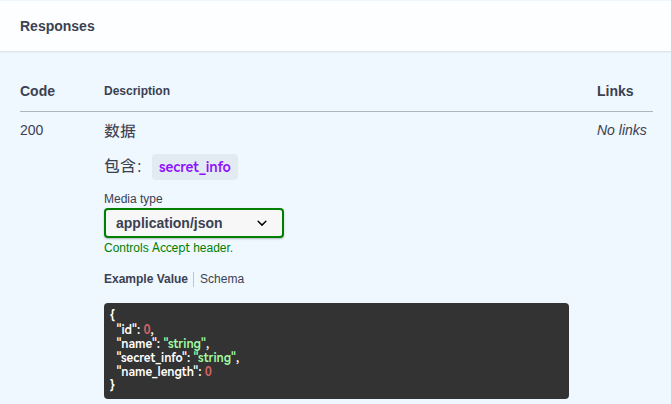
For this situation, g0v0 also provides a shortcut. You can use the api_doc helper function to wrap the model, which will automatically call generate_typeddict() and output the includes to the response description.
from app.utils import api_doc

@router.get("/data/{data_id}",
    responses={
        200: api_doc(
            desc="Data",
            model=DataModel,
            includes=["secret_info"],
            name="DataResponse",
        )
    }
)
async def get_data(data_id: int, db: Database):
    data = await db.get(Data, data_id)
    return Data.transform(data, includes=["secret_info"])
In Swagger UI, it displays as follows: